| Physics and Astronomy |
Back to top
C programming on your Linux or MS Windows laptopFor a programming environment under Linux or MS Windows we now recommend using the same system we will be using during classes, Code::Blocks. This is free software. DownloadsOnce you are on the Code::Blocks web site the easiest way to download it is to just choose the Downloads ... Binaries link from the left-hand sidebar. NB: when installing Code::Blocks put it ito a folder whose name does not contain spaces or other "funny" characters. Use a folder name that would be a legal C variable name! (Although feel free to use capitals.) MS Windows versionThese are normally a two or three possible downloads and it's important to use the right one. Look for the IF UNSURE advice. Using Code::BlocksCompiler optionsWe strongly recommend using the same compiler settings as we are using in-class. You should only need to do this once for it to apply to all projects. NB: these are already set on our machines, but you will need to set them up if you have installed Code::Blocks yourself. To set your compiler options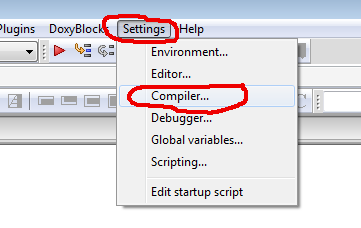 Go to the "Settings" menu and choose
"Compiler".
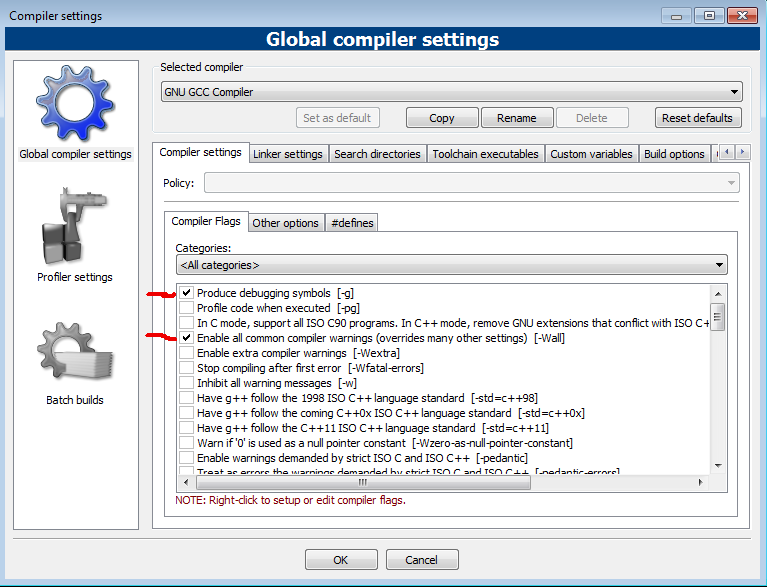
An panel such as this should appear:
It should open showing the "Compiler settings" tab and the "Compiler Flags" sub-tab. Click on the checkboxes for: -g -Wall (Note that the options appear at the end of the line of text for each option.) Other options sub-tabNow click on the "Other options" sub-tab and manually enter: -std=gnu99 -Werror 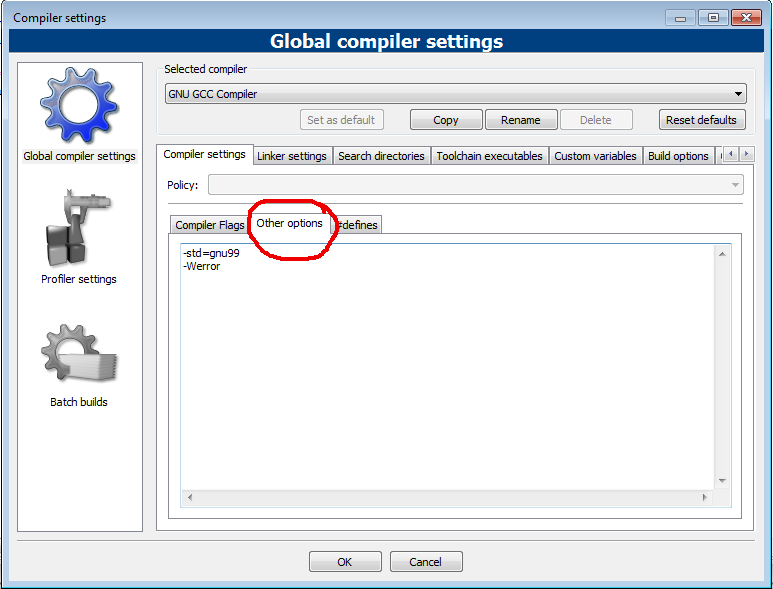 Log in
|